WRDB Graph utilizes tabs in a fashion similar to Microsoft Excel. Like Excel, you can create new tabs as-needed, name them, rearrange their order, and delete them when no longer needed. Each tab contains exactly one graph, and that graph can be in any one of the supported formats.
By default, a new graph is created with one tab called "Graph 1"; you can rename this tab by double-clicking on the tab name.
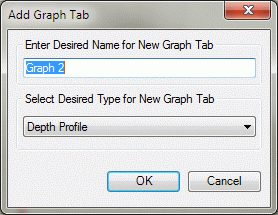
At all times the last tab labelled "New..." is available as a quick way to create a new graph tab. When you click on it, the following dialog appears, giving you a quick way to select one of the most commonly used graph formats:
Tabs can be rearranged by simply clicking and dragging them to a new position. Several more advanced tab management features can be accessed using View | Tabs on the main menu, or by right-clicking on a tab name to see this context menu:
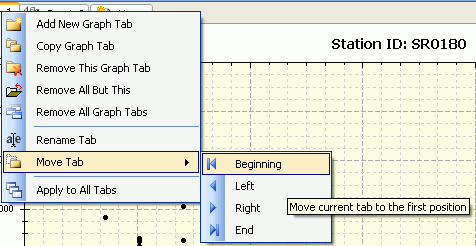
Most items are self-explanatory, except perhaps:
Copy Graph Tab: this duplicates the currently visible graph tab giving it the name "Copy of..." and retaining all characteristics of the source tab, including graph type, formatting, and series. This is useful for making minor modifications to an existing complex graph without having to recreate all the elements.
Apply to All Tabs: When checked, certain subsequent operations will apply to or be performed for all graph tabs; these include printing, sending to clipboard, and setting graph options. Note that this does not affect the default settings for newly created tabs, which are controlled by the Default settings specified on the Graph Options form's Reset and Defaults buttons.